


Company News
How to Choose the Right Single Board Computer for Industrial Automation Projects
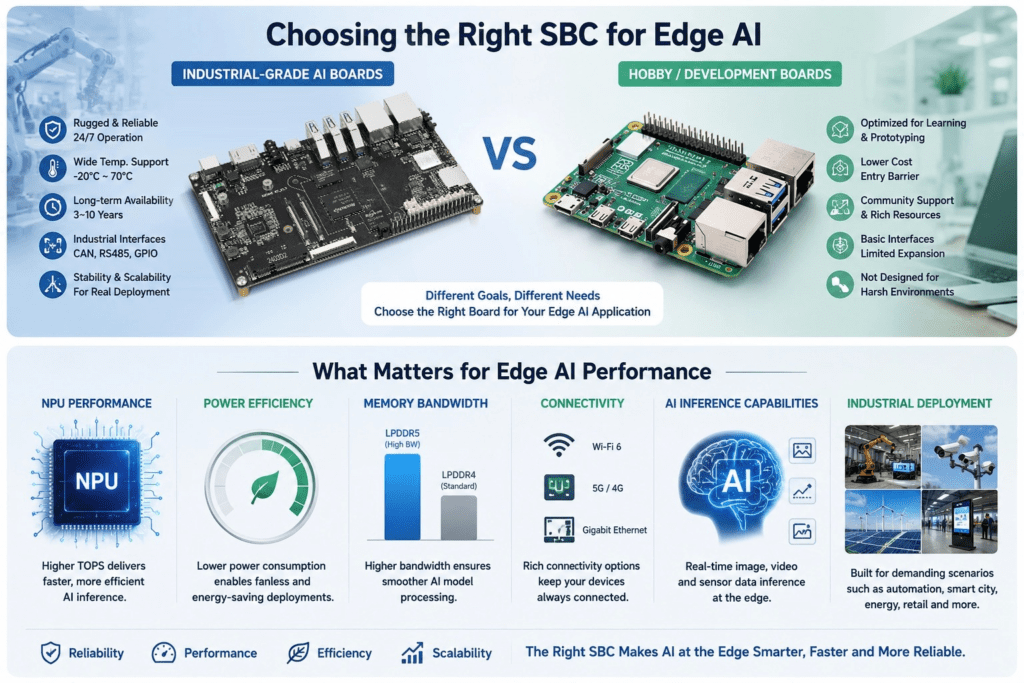
May
Picking a single board computer for an industrial automation project is a different exercise from picking one for a hobby project or a prototype. The stakes are higher, the requirements are narrower, and the mistakes are harder to walk back once you’re in production.
A consumer SBC that works fine on your desk may fail within a month inside a control cabinet running at 70°C. A board with no long-term availability guarantee can disappear from the market right when you need to scale. And a board without the right bus interfaces, CAN, RS-485, and isolated GPIO can force a costly redesign.
This guide walks through the decisions that actually matter when choosing an industrial SBC. Whether you’re selecting hardware for a SCADA system, a smart factory edge gateway, an NVR storage controller, or a custom embedded control panel, the same questions apply. We’ll also look at where ARM-based boards, particularly those built on the Rockchip RK3576 and RK3588, fit into the picture compared to legacy options.
1. Start with the Environment, Not the Specs
Most engineers start by looking at processor benchmarks or memory configurations. That’s the wrong place to start for industrial work. The first question is: what environment does this board live in?
Industrial settings vary enormously. A board sitting inside a climate-controlled server rack in a logistics warehouse is living a very different life from one mounted inside a CNC machine on a factory floor, or an outdoor environmental monitoring station in northern Europe.
Operating Temperature Range
Standard SBCs typically operate between 0°C and 55°C. That’s fine for office environments and most indoor settings. Industrial environments regularly push beyond those limits; a machine enclosure in a foundry can exceed 70°C in summer, and outdoor deployments in cold climates can drop to -30°C or lower.
Look for boards rated to an extended temperature range, ideally -40°C to 85°C if your environment is genuinely harsh. An SBC that’s been validated across that range isn’t just using off-spec components; the thermal design, the PCB layout, and the firmware have all been tested to hold up under those conditions.
Humidity, Vibration, and Dust
IP65-rated enclosures keep the board safe from dust and water ingress, Still, the board itself needs to be laid out for industrial conditions, conformal coating on the PCB, connectors with proper latching, and capacitors that don’t drift under vibration. These aren’t details you’ll find in a spec sheet headline, which is why the supplier’s industrial track record matters as much as the hardware.
Fanless or Active Cooling
Fans fail. In a 24/7 industrial deployment, a failed fan can trigger a thermal shutdown at the worst possible moment. Fanless designs with passive heatsinks are preferred for most industrial control use cases, even if they require more careful thermal planning during enclosure design.
2. Industrial I/O: The Interfaces That Actually Matter
Consumer SBCs are built for HDMI, USB, and Wi-Fi. Industrial embedded systems need a different set of interfaces, and the absence of any one of them can mean the difference between a working system and a system that requires an expensive daughter board or an external controller.
CAN Bus
Controller Area Network (CAN) is standard in automotive systems and increasingly common in industrial machinery, robotics, and building automation. If your devices communicate over CAN, you need a board with native CAN support. Adding it externally via USB is possible, but it adds latency and a potential point of failure.
RS-485 / RS-232
Despite being decades-old standards, RS-485 and RS-232 are still the backbone of a huge number of industrial sensor and actuator networks. Flow meters, PLCs, motor drives, and older SCADA devices all commonly use RS-485. A board without native serial interfaces will need an adapter, which adds cost, board space, and integration complexity.
Isolated GPIO
In industrial environments, ground loops and voltage spikes are real hazards. Isolated GPIO pins protect the board from transients on the I/O lines critical in environments where the SBC sits alongside high-current equipment. Boards marketed for consumer or maker use almost never include isolation; it’s a feature that specifically marks a board as designed for industrial deployment.
Dual Gigabit Ethernet
Single Ethernet is adequate for many deployments, but dual Gigabit Ethernet opens up more demanding use cases: network redundancy for high-availability systems, separate control and data networks, and direct connection to industrial switches without additional hardware. Boards like theKickpi K8 (RK3588) andKickpi K7 (RK3576) include dual GbE as a standard feature, which is still far from universal on development boards.
Wide-Range DC Input
Industrial power supplies commonly output anywhere from 9V to 36V DC, depending on the application. A board that only accepts 5V USB-C input needs a buck converter in the chain, adding components and failure points. Wide-range DC input (9–36V) is a meaningful spec for any board going into a real industrial control cabinet.
3. Long-Term Availability: The Spec Most Buyers Ignore
Here’s a scenario that plays out regularly in industrial electronics: a company builds a product around a development board, ships a few hundred units, then comes back 18 months later to order more, only to find the board is discontinued, the chip is end-of-life, or the supplier has changed the hardware revision without notice.
For consumer electronics, this is manageable. For industrial automation products with 7–10 year service life expectations, it can be a significant problem. Customers expect spare parts. Maintenance contracts assume consistent hardware. Certification (CE, FCC, UL) has to be redone if the hardware changes.
What Long-Term Availability Actually Means
Look for suppliers who explicitly commit to long-term availability, typically a 5 to 10 year supply guarantee on both the board and the processor. This is more common among suppliers who specifically serve industrial and B2B customers rather than the hobbyist market.
Controlled silicon revision tracking is part of this. Industrial SBC suppliers maintain records of which chip revision is on each board batch, so that replacement boards have identical behavior. Consumer-grade suppliers rarely do this.
OEM/ODM Services
If you’re building a product rather than a one-off system, OEM and ODM services matter. A supplier who can customize the board layout, branding, and feature set and then commit to producing that specific configuration for years is a very different partner from one who sells off-the-shelf hardware. Kickpi’s customized board services cover exactly this: tailored hardware for specific industrial use cases, with the supply continuity that production-grade deployments require.
4. ARM vs. x86 for Industrial Automation
Ten years ago, this wasn’t a real debate. x86 was the default for anything needing real computing power in an industrial setting: Atom-based boards, low-power Intel chips, and Windows-based HMI systems. ARM was for microcontrollers and low-end embedded applications.
That’s changed. ARM SoCs, particularly the Rockchip RK3576 and RK3588, now deliver enough CPU and NPU performance to handle most industrial computing tasks, with meaningful advantages in power consumption, thermal output, and cost.
Where ARM Wins
- Power consumption: ARM chips generally use 5-15W when under load. Comparable x86 chips often run 15–35W. In a fanless enclosure, that’s a significant difference in thermal management complexity.
- Cost: ARM-based industrial boards are generally less expensive than equivalent x86 boards, which matters when you’re deploying dozens or hundreds of units.
- AI inference: Integrated NPUs on chips like the RK3576 (6 TOPS) and RK3588 (6 TOPS) enable on-device machine vision and predictive maintenance without an external AI accelerator.
- Form factor: Lower power consumption and smaller boards that are easier to fit into compact enclosures and retrofit applications.
Where x86 Still Has the Upper Hand
- Legacy software compatibility: If you’re using existing Windows-based SCADA software or HMI applications that haven’t been ported to ARM, x86 is still needed.
- Mature real-time OS support: Some industrial RT operating systems have deeper x86 support, though Linux PREEMPT_RT on ARM has closed this gap considerably.
- Raw single-core performance: For specific workloads that don’t parallelize well, high-clocked x86 cores can still outperform ARM big.LITTLE configurations.
- For most new industrial automation designs where software portability isn’t a constraint, ARM is the better starting point in 2026. The RK3576 vs Raspberry Pi comparison on the Kickpi blog gives a useful sense of where the current generation of ARM chips sits relative to more familiar embedded benchmarks.
5. SBC vs. PLC: Choosing the Right Tool
This comes up constantly in industrial automation discussions, and it’s worth being direct about it: PLCs and SBCs solve different problems, and the decision isn’t always either/or.
What PLCs Are Good At
Programmable Logic Controllers were designed for deterministic, real-time control of physical processes, reading sensors, driving actuators, and executing ladder logic with sub-millisecond timing guarantees. They’re ruggedized, certified for industrial environments, and supported by a massive ecosystem of engineering tools and integrators. If you’re replacing or extending a PLC-controlled production line, another PLC is often the right choice.
What SBCs Do Better
SBCs excel at everything above the PLC layer: data aggregation, protocol translation, local analytics, HMI rendering, cloud connectivity, and increasingly AI-powered inspection and anomaly detection. An SBC running Linux can act as an edge gateway between a factory floor full of PLCs and a cloud SCADA platform, doing things a PLC was never designed to do.
The architecture that’s emerged in many modern factories is a hybrid: PLCs handle the hard real-time control loop, while an industrial SBC handles the data, analytics, and connectivity layer above it. This is where boards like the Kickpi K8 with its dual GbE, multiple serial interfaces, and 6 TOPS NPU are genuinely useful: not as PLC replacements, but as the intelligent gateway running alongside the control system.
For a deeper look at the specific industrial control use cases Kickpi boards support, the Industrial Control applications page covers the typical deployment architectures.
6. Processor Choice: RK3576 vs RK3588 for Industrial Use
If you are looking for ARM-based industrial SBCs, in 2026, the two processors you will see most often in this segment are Rockchip RK3576 and RK3588. They’re different chips aimed at different points on the performance-cost curve.
Rockchip RK3576
The RK3576 is an 8-core chip (4× Cortex-A72 + 4× Cortex-A55) with a 6 TOPS integrated NPU and a Mali-G52 GPU. It’s not a low-end chip; it handles 4K video decoding, multi-display output, and most industrial AI inference tasks without issue. Power consumption is lower than the RK3588, which makes it more suitable for passively cooled enclosures and applications with tighter thermal budgets.
TheKickpi K7 (RK3576) is the flagship RK3576 board in the Kickpi lineup. It’s built for industrial deployments, dual GbE, CAN bus, RS-485, wide temperature support, and comes with a long-term availability commitment from the supplier. TheK7S andK7C variants offer slightly different I/O layouts for applications where enclosure dimensions or connector placement make a difference. Kickpi’s own blog post onthe K7 as a next-gen industrial SBC covers the industrial-grade design decisions in detail.
Rockchip RK3588
The RK3588 is a step up: 8 cores (4× Cortex-A76 + 4× Cortex-A55), the same 6 TOPS NPU, but significantly higher CPU throughput, support for up to 32GB LPDDR5, 8K video decode, and more PCIe bandwidth. It draws more power than the RK3576 thermal management needs more attention, but for compute-heavy applications like multi-stream video analytics, local LLM inference, or high-throughput data processing, the extra headroom matters.
The Kickpi K8 (RK3588) covers most high-end industrial requirements: dual GbE, NVMe storage via M.2, SATA 3.0, and a layout designed for industrial enclosures. For IoT gateway deployments with built-in 4G connectivity, the K8D (RK3588S2) is a closely related variant worth comparing.
Which One to Choose
A useful rule of thumb: if your application is primarily about connectivity, protocol translation, moderate AI inference, and running a Linux-based control or data layer, the RK3576 is usually sufficient, and the lower power draw is a genuine advantage. If you’re doing multi-camera AI vision, running heavier models, or need the maximum I/O bandwidth, the RK3588 earns its higher cost and thermal output.
7. Software Stack and OS Support
Hardware decisions can’t be made in isolation from software. An industrial SBC is only as useful as the software stack running on it, and the quality of that stack varies considerably across suppliers.
Linux Is the Baseline
For most new industrial automation projects, Linux, specifically Debian or Ubuntu LTS, is the working assumption. Linux gives you access to mature industrial frameworks (Modbus libraries, MQTT clients, OPC-UA stacks, ROS for robotics), a strong security update cadence, and a familiar development environment for most embedded engineers.
Check whether the board ships with maintained BSP (Board Support Package) images. An outdated kernel with missing driver support for key interfaces is one of the most common frustrations with budget SBCs. For RK3576 and RK3588 boards, Ubuntu 24.04 support has improved substantially through 2025 and into 2026, However, it’s still worth verifying that the specific interfaces you need, CAN, RS-485, and isolated GPIO, are supported in the available image.
Real-Time Requirements
If your application has real-time control requirements that a standard Linux kernel can’t meet, look at PREEMPT_RT patches or a dual-OS architecture where a real-time kernel handles the control loop, and Linux handles everything else. Some industrial SBCs support this architecture natively. This is a rare requirement in pure edge computing and data aggregation applications, but critical in direct machine control.
Android for HMI Applications
For industrial HMI panels and kiosk-style terminals, Android can actually be a better fit than Linux. Touchscreen input is well supported, the app ecosystem is mature, and support for Android BSPs from Rockchip is arguably the best in the ARM SBC market. Both the K7 and K8 families support Android 13/14, making them usable in smart retail terminals, control panels, and interactive display applications, as well as their industrial control use cases.
8. Edge AI in Industrial Automation: What’s Actually Practical
AI in industrial automation has moved from a marketing concept to a practical tool over the past two years. The use cases that have proven out in real deployments aren’t theoretical; they’re specific, measurable, and increasingly cost-effective to implement on ARM-based edge hardware.
Machine Vision and AOI
Automated optical inspection (AOI) is probably the most mature industrial AI application running on edge SBCs today. A camera-equipped RK3588 board running YOLOv8 or a similar detection model can identify defects on a production line in real time, without sending video to a cloud server. The 6 TOPS NPU handles the inference, the dual GbE handles data export, and the whole system fits inside a compact enclosure.
Predictive Maintenance
Vibration sensors, current clamps, and thermal cameras generate streams of data that are better analyzed locally than transmitted to the cloud. An edge SBC running anomaly detection models can flag equipment degradation before failure, without the latency or cost of cloud analytics. This is a strong fit for the edge AI gateway for smart factory use cases that RK3576 and RK3588 boards are increasingly used for.
Protocol Translation and SCADA Integration
Not all industrial AI is about inference. A lot of the practical value in smart factory deployments comes from an SBC acting as an intelligent protocol bridge reading Modbus or PROFIBUS sensors, normalizing the data, and publishing it to an OPC-UA or MQTT broker for the SCADA system. This is a well-established role for Linux-based SBCs, and one that benefits from reliable serial interfaces and stable networking.
For a broader view of the application categories Kickpi’s boards target, the AI and industrial tech applications page outlines the typical deployment patterns.
9. How to Evaluate Suppliers (Not Just Boards)
In industrial automation, the supplier relationship matters almost as much as the hardware. A board that’s technically excellent but backed by a supplier who disappears after the sale is a bad choice. Here’s what to look for.
Industrial Track Record
Look for suppliers who specifically serve industrial and B2B customers, not just the maker and hobbyist market. The documentation, the BSP quality, the support responsiveness, and the long-term supply commitments are all better from suppliers who understand what industrial customers need. Kickpi’s background as a customized industrial board development provider with a focus on OEM/ODM services reflects this orientation.
Certification Support
CE, FCC, and RoHS certification documents should be available. If you’re integrating an SBC into a product that requires UL or IEC certification, the supplier’s ability to provide test reports and application support matters. Early retrofitting certification after a design is finalized is expensive.
Volume Pricing and Customization
If you’re building more than a handful of units, volume pricing and the option to customize the board for your application are relevant. This might mean removing interfaces you don’t use, adding connectors that suit your enclosure, or having the supplier brand the board for your product. These services are more commonly available from dedicated industrial SBC manufacturers than from the broader dev board market.
Community and Documentation
Good documentation shortens development time considerably. A supplier who maintains a wiki, provides BSP source code, and has an active forum or support channel is worth more in practice than marginal hardware improvements. Check the quality of available documentation before committing to a platform; a well-maintained wiki and resource hub is a signal worth weighing.
Quick Reference: Industrial SBC Selection Checklist
Run through this before finalizing any board for an industrial automation project:
- Environment: What are the min/max operating temperatures? Is dust/moisture a concern? Is Vibration a problem?
- Interfaces: Native CAN bus, RS-485, and isolated GPIO on board? How many serial ports?
- Networking: Networking: Single or dual GbE? Network redundancy needed? Is cellular (4G/5G) needed?
- Power input: What voltage does your power supply put out? Does the board accept wide-range DC input (9–36V)?
- Thermal management: Do you need fanless operation? Is there a validated passive thermal solution on board?
- Compute requirements: How much CPU headroom does your application need? Do you need AI inference (NPU)?
- Storage: eMMC only, or NVMe/SATA for higher throughput? What is the write endurance requirement?
- OS/Software: Linux or Android? What BSP version is available? Are the drivers for your interfaces maintained?
- Lifecycle: Does the supplier offer a 5–10 year availability guarantee? OEM/ODM customization?
- Certifications: CE, FCC, RoHS documentations? What do you need for your end product certification?
Final Thoughts
Choosing an industrial SBC comes down to matching hardware capabilities to real-world deployment conditions, not chasing the highest benchmark numbers or the lowest price. The boards that work best in production over years of 24/7 operation aren’t necessarily the most powerful or the cheapest. They’re the ones where the I/O matches the application, the thermal design suits the enclosure, the software stack is properly maintained, and the supplier takes long-term availability seriously.
For most new industrial automation and edge AI gateway projects in 2026, ARM-based boards built around the Rockchip RK3576 and RK3588 are worth serious consideration. They’ve crossed the threshold where performance is genuinely sufficient for demanding real-world workloads, and the ecosystem around them has matured enough that software integration is no longer the obstacle it was two or three years ago.
TheKickpi K7 (RK3576) andKickpi K8 (RK3588) are the boards in the Kickpi lineup most relevant to industrial automation work. You can find full specifications, comparison, and customization options on the Kickpi products page. For production deployments with specific hardware requirements, the OEM/ODM customization service is the right starting point.
If you’re still in the early stages of evaluating ARM boards more broadly, the Top 10 ARM Development Boards in 2026 guide puts the industrial options in context alongside the wider market.
Frequently Asked Questions
What makes a single-board computer suitable for industrial automation?
An industrial SBC needs to handle extended operating temperatures, provide native industrial bus interfaces (CAN, RS-485, isolated GPIO), accept wide-range DC power input, operate continuously without fans where possible, and come with a long-term availability commitment from the supplier. Software support, specifically a maintained BSP and Linux kernel with industrial driver coverage, is equally important.
Is an SBC better than a PLC for industrial automation?
They serve different roles. PLCs are designed for hard real-time deterministic control of physical processes. SBCs are more appropriate for data aggregation, analytics, AI inference, protocol bridging, and cloud connectivity. Modern industrial architectures typically use both PLCs for the control layer and SBCs for the layer of intelligence and connectivity above.
How does RK3576 differ from RK3588 for industrial applications?
The RK3576 is more power efficient and should be preferred for passively cooled enclosures and applications where moderate compute headroom is acceptable. The RK3588 has higher CPU throughput, supports more memory, and can handle more demanding workloads, such as multi-stream video analytics and heavier AI models. Both carry a 6 TOPS NPU. For most industrial edge AI and control gateway applications, the RK3576 is sufficient; choose RK3588 when you need the extra compute headroom.
Can ARM-based SBCs run SCADA systems?
Yes, many popular SCADA platforms (Ignition, Node-RED, OpenSCADA) run on ARM Linux out of the box. Native support for CAN and RS-485 on industrial ARM boards makes direct sensor and device integration easy. The main exception is proprietary Windows-based SCADA software that hasn’t been ported to ARM, where x86 hardware remains necessary.
What should I look for in a long-term industrial SBC supplier?
Look for explicit supply guarantees (5–10 years), controlled silicon revision tracking, OEM/ODM customization capability, available certification documentation (CE, FCC, RoHS), and a software support track record. The suppliers who focus solely on industrial and B2B customers, not the hobbyist market, are generally more serious about these requirements.
Where can I find Kickpi boards suitable for industrial automation?
TheKickpi products page lists all available boards with full specifications. The two main industrial automation options are the K7 (RK3576) and K8 (RK3588). If you need custom hardware, please get in touch with Kickpi on the customized services page.
